

Description
Custom User Registration Fields for Tutor LMS lets you add any extra fields to your Tutor LMS student and instructor registration forms — without writing a single line of code.
Need to collect a phone number at registration? A company name, teaching qualification, or country? Configure it in two minutes from the WordPress admin panel and the field appears on your registration form automatically.
Unlike generic custom field plugins, this plugin is built specifically for Tutor LMS. Every field you add is displayed in all the places your team actually works:
- ✅ Student registration form — fields appear automatically.
- ✅ Instructor registration form — separate field sets for instructors.
- ✅ Tutor LMS frontend dashboard — students and instructors can view and update their own data from the Tutor profile settings page.
- ✅ Tutor LMS admin backend — LMS Managers can read and edit all custom field data from Tutor’s built-in user management interface.
- ✅ WordPress admin profile pages — data also visible in the standard WP admin for admins who work there.
Field types supported
- Text
- Phone (tel)
- Number
- URL / Website
- Date
- Textarea (multi-line)
- Select / Dropdown (with your own options)
Key features
No-code field builder — add, edit, and reorder fields from a clean settings page. No PHP, no shortcodes, no template editing required.
Required or optional — toggle each field as required or optional directly in the settings UI. Required fields enforce completion at registration.
Separate student and instructor field sets — configure entirely different fields for the student registration form and the instructor registration form.
Placeholder text — set placeholder text per field to guide users on what to enter.
Dropdown options — for Select fields, define your options list (one per line) directly in the settings panel.
Automatic data display — data saved at registration is immediately visible on the Tutor frontend dashboard profile, the Tutor admin backend, and the WP admin user profile. Updating data from any of these locations works correctly.
v1.x upgrade safe — existing field configurations from plugin version 1.x are automatically migrated to the v2.0 data format on first activation. No data loss.
Who is this plugin for?
- Tutor LMS site owners who need to capture extra information at registration (phone, company, qualifications, country, etc.)
- Online course platforms that need instructor vetting fields (teaching experience, certifications, areas of expertise)
- LMS admins who need to view and manage that data without leaving the Tutor interface
How it works
- Install and activate the plugin (Tutor LMS must also be active).
- Go to Users Tutor LMS Fields in your WordPress admin.
- Add fields under the Student Registration Fields or Instructor Registration Fields tab.
- Give each field a label, a meta key, a type, and optionally a placeholder or select options.
- Save — fields appear on the registration forms immediately.
Developer notes
All field values are stored as standard WordPress user meta, accessible via get_user_meta( $user_id, 'your_meta_key', true ).
The plugin hooks into the correct Tutor LMS action hooks:
tutor_student_reg_form_end— student registration form displaytutor_instructor_reg_form_end— instructor registration form displaytutor_profile_edit_input_after— Tutor frontend dashboard profile edittutor_profile_update_after— Tutor frontend profile save (AJAX)tutor_backend_profile_fields_after— Tutor admin backend metaboxshow_user_profile/edit_user_profile— WP admin profile pagesuser_register— registration savepersonal_options_update/edit_user_profile_update— WP admin profile save
More plugins by UserElements
Screenshots
Settings page — Student Registration Fields tab. Add labels, meta keys, field types, required toggle, and placeholders. 
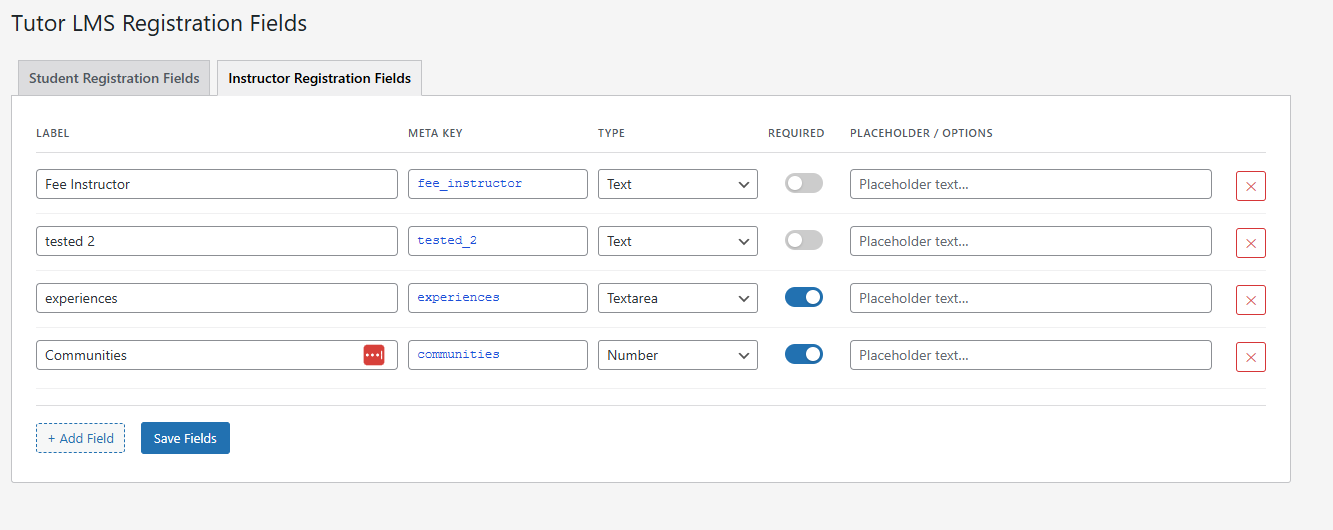
Settings page — Instructor Registration Fields tab. Independent field configuration for instructor registration.
Installation
From WordPress.org (recommended)
- In your WordPress admin, go to Plugins Add New Plugin.
- Search for Custom User Registration Fields for Tutor LMS.
- Click Install Now, then Activate.
Manual installation
- Download the plugin ZIP file.
- In your WordPress admin, go to Plugins Add New Plugin Upload Plugin.
- Upload the ZIP file and click Install Now, then Activate.
After activation
- Go to Users Tutor LMS Fields in your WordPress admin.
- Add your custom fields under the Student or Instructor tabs.
- Save — fields appear on the Tutor LMS registration forms immediately.
FAQ
-
Does this plugin require Tutor LMS?
-
Yes. This plugin is built specifically for Tutor LMS and requires it to be installed and active. It will not activate without Tutor LMS present.
-
I added fields but they don’t appear in the Tutor dashboard. What’s wrong?
-
Make sure you saved your fields on the settings page (Users Tutor LMS Fields). Also confirm that you are viewing the correct tab — student fields only appear for students; instructor fields only appear for users who have instructor status in Tutor LMS.
-
Where exactly do students and instructors see their custom field data?
-
After registering, users can view and update their custom field data from the Tutor LMS frontend dashboard profile settings page (the same place they update their photo, bio, and job title). LMS Managers can view and edit the same data from Tutor’s admin backend.
-
Can I add different fields for students and instructors?
-
Yes. The plugin has two completely separate field sets: one for the student registration form and one for the instructor registration form. Configure them independently under the two tabs on the settings page.
-
Can I make a field required?
-
Yes. Each field has a Required toggle in the settings UI. Required fields enforce completion at the registration form level.
-
What field types are available?
-
Text, Phone, Email, Number, URL/Website, Date, Textarea, and Select/Dropdown. For Select fields, you define your own options list (one per line) in the settings.
-
How is the data stored?
-
All values are stored as standard WordPress user meta using the meta key you define. You can read them anywhere with
get_user_meta( $user_id, 'your_meta_key', true ). -
Can I use this with WooCommerce, BuddyPress, or other plugins?
-
The plugin stores data as standard user meta, so it is readable by any plugin that reads user meta. The registration form integration and profile display are Tutor LMS-specific.
-
I upgraded from v1.x — are my existing fields still there?
-
Yes. The plugin automatically migrates your v1.x field configuration to the new v2.0 format on first activation. All existing field labels and meta keys are preserved. You will now see additional options (field type, required toggle, placeholder) for each migrated field.
-
Can I reorder fields?
-
You can remove and re-add fields in any order. Drag-and-drop ordering is planned for a future release.
-
Does this work with Tutor LMS Pro?
-
Yes. The plugin is compatible with both the free and Pro versions of Tutor LMS.
Reviews

Contributors & Developers
“Custom User Registration Fields for Tutor LMS” is open source software. The following people have contributed to this plugin.
Contributors
Translate “Custom User Registration Fields for Tutor LMS” into your language.
Interested in development?
Browse the code, check out the SVN repository, or subscribe to the development log by RSS.
Changelog
1.4: May 2026
- Complete rewrite — all code from v1.x replaced.
- Fixed: Custom fields were not displayed in the Tutor LMS frontend dashboard profile settings page. Added
tutor_profile_edit_input_afterandtutor_profile_update_afterhooks. - Fixed: Custom fields were not visible to LMS Managers in the Tutor admin backend. Added
tutor_backend_profile_fields_afterhook. - Fixed: PHP warning on the “Add New User” page —
user_new_formpasses a string, not a WP_User. Now guarded withinstanceof WP_Usercheck. - Fixed: “Remove” button on dynamically added field rows had no event handler. Replaced
forEachinitialization with event delegation on the parent container. - Fixed: Missing
tutor-form-rowwrapper caused custom fields to break the Tutor registration form CSS grid layout. - Fixed: Duplicate save logic — two functions were both hooked to
user_register, one silently failing due to acurrent_user_cancheck that always returns false for new users during registration. Consolidated into a singletutor_cuf_persist()function. - Fixed: Duplicate
id="submit"HTML attribute on both form submit buttons. Now uses unique names without duplicate IDs. - Fixed:
Requires Pluginsheader was duplicated in the plugin file. - Fixed: PHP version mismatch between plugin header (7.4) and readme.txt (7.2). Both now declare 7.4.
- Fixed: Settings page array index mismatch — if label and meta key arrays had different lengths, data could be silently corrupted. Now uses null coalescing.
- New: Field type selector — Text, Phone, Email, Number, URL, Date, Textarea, Select/Dropdown.
- New: Required field toggle — mark fields as required or optional per field.
- New: Placeholder text — set per-field placeholder text.
- New: Select field options — define dropdown options (one per line) in the settings UI.
- New: Type-aware sanitization — URL fields use
esc_url_raw(), email usessanitize_email(), etc. - New: Automatic v1.x data migration — existing field configurations are migrated on first activation.
- New: Meta key auto-sanitization in the admin JS — invalid characters are replaced as the user types.
- New: Frontend CSS for required field asterisk and Tutor dashboard profile section headings.
- Changed: Option keys renamed from
tutor_field_cuf_fields/tutor_field_cif_fieldstotutor_cuf_student_fields/tutor_cuf_instructor_fields. Migration runs automatically. - Changed: Settings page tab navigation now uses URL parameters instead of JavaScript
display:nonetoggling, making it compatible with the WordPress admin back button.
1.3: August 2024
- Fixed:
update_user_metaerror preventing proper data saving.
1.2: August 2024
- Fixed: Tested up to value.
- Added:
wp_enqueuecommands. - Fixed: Internationalization.
- Prefixed options and transients.
1.1: August 2024
- Fixed: Plugin name.
1.0: August 2024
- Initial release.