

Description
Custom Fields Account Registration For WooCommerce is the most flexible way to extend the default WooCommerce registration form with unlimited custom fields. Collect any extra information from your customers at the point of sign-up — no coding required.
Whether you need a simple text input, a multi-option checkbox group, a file-upload field, or full billing and shipping address fields on the registration page, this plugin gives you complete control from an intuitive drag-and-drop admin panel.
Custom field data is saved to each user’s profile and is neatly displayed on the My Account page under a dedicated custom tab, keeping everything organised for both the store owner and the customer.
📄 Documentation | 🛒 Get Pro | 💬 Support
🔑 KEY FEATURES
Field Types Supported
* Text field
* Textarea
* Checkbox & checkbox group
* Radio button
* Select / dropdown
* Number field
* Date picker
* File / document upload
* Password field
* Hidden field
Registration Form Controls
* Add, edit, and remove custom fields with zero code
* Drag-and-drop field reordering for complete layout control
* Mark any field as required with a custom validation message
* Show or hide individual field labels
* Display or hide fields on the WooCommerce registration form independently
Address & Account Fields
* Add First Name, Last Name, and Company Name fields to registration
* Add City, State, Postcode, and Country fields to registration
* Full Billing address fields on the registration form
* Full Shipping address fields on the registration form
* Enable / disable the State field and set its label, slug, and required status
* Control State field width from the settings panel
My Account Page Integration
* Automatically show saved custom field data on the My Account page
* Dedicated custom tab on the My Account dashboard
* Customise the tab title and the form heading text
* Toggle visibility of each custom field on the My Account page independently
General Settings & Authentication
* Enable / disable the entire plugin without deactivating it
* Enable / disable the built-in WooCommerce authentication (login) section
* Change the Login & Registration section title text
* Change the Login form title text independently
* Change the Registration form title text independently
Email Notifications
* Enable / disable automatic registration confirmation emails to customers
* Customise the email subject line
* Customise the full email body message with dynamic placeholders
Developer & Admin Friendly
* React-powered admin UI — fast, modern, and responsive
* REST API–based settings save (no page reloads)
* Nonce-verified AJAX actions for security
* Translatable — ships with a .pot file; already available in Chinese, Dutch, Russian, Spanish, and more
* Compatible with all major WooCommerce-ready themes
🚀 HOW IT WORKS
- Install and activate the plugin.
- Go to Custom Fields Registration in the WordPress admin menu.
- Click Add New Field, choose a field type, set a label, slug, and options, then save.
- Drag fields into your preferred order.
- Head to your WooCommerce My Account Register page — your new fields appear instantly.
- Customer data is stored against the user profile and shown on the My Account custom tab.
Screenshots
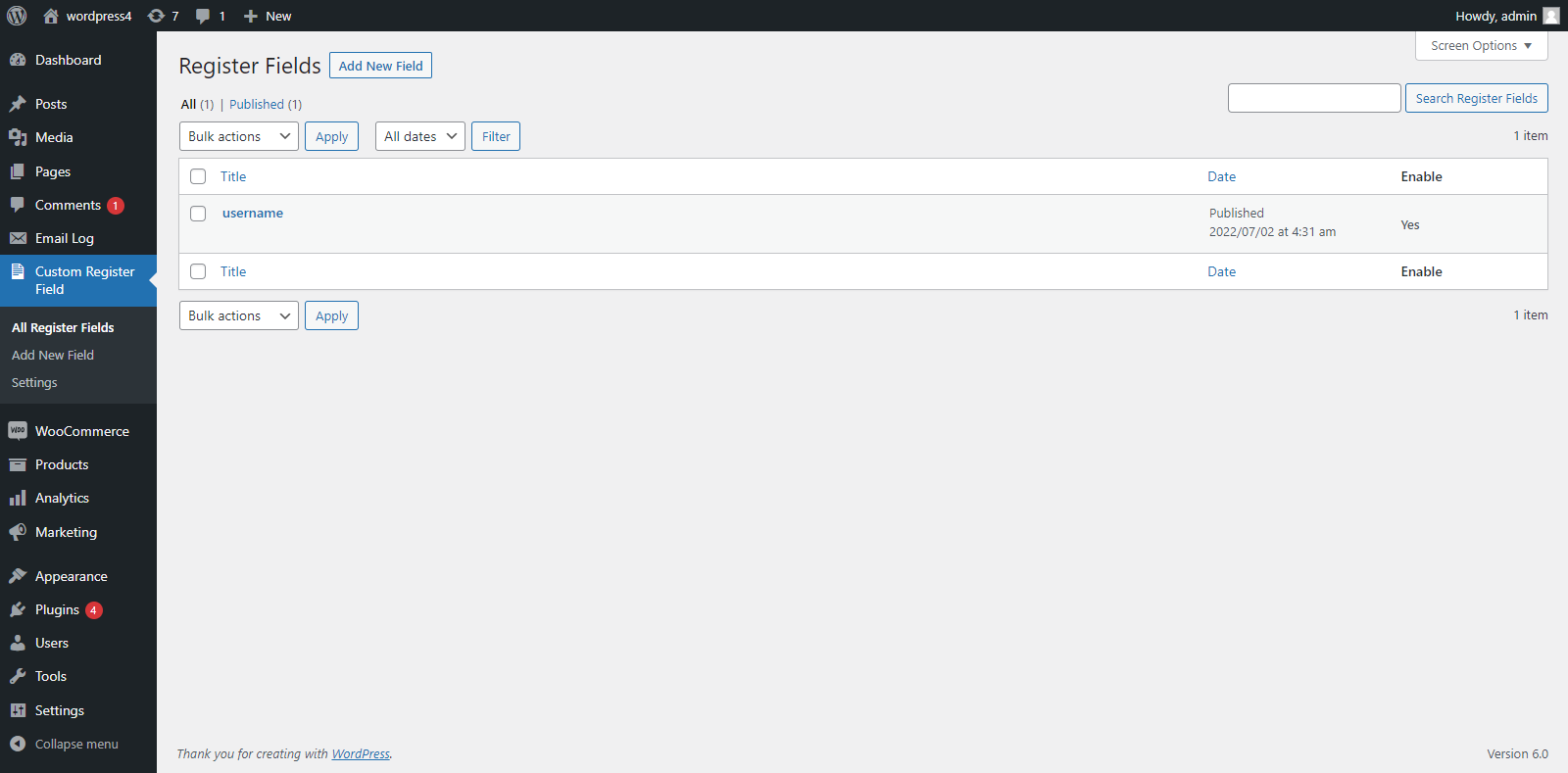
Field Manager — Add, edit, reorder, and delete custom registration fields from the React-powered admin panel. 
Add New Field Modal — Choose field type, set label, slug, placeholder, required status, and more. 
General Settings — Control authentication, email notifications, label visibility, title text, and My Account tab customisation. 
Registration Form (Frontend) — Custom fields displayed alongside the standard WooCommerce registration form.
Installation
From the WordPress Dashboard
- Navigate to Plugins Add New.
- Search for Custom Fields Account Registration For WooCommerce.
- Click Install Now, then Activate.
Manual Upload
- Download the plugin
.zipfile. - Go to Plugins Add New Upload Plugin.
- Choose the
.zipfile and click Install Now. - Click Activate Plugin.
After Activation
- Go to Custom Fields Registration in the admin sidebar to add your first custom field.
- Adjust global settings (email, labels, authentication) from the General Settings tab.
FAQ
-
Does this plugin work with the default WooCommerce registration form?
-
Yes. All custom fields are rendered on the standard WooCommerce registration form on the My Account page. No shortcode or page builder is needed.
-
Where is the submitted field data stored?
-
All custom field data is saved as WordPress user meta and is visible on the user’s profile in the WordPress admin as well as on the My Account custom tab on the frontend.
-
Can I make a field mandatory?
-
Yes. When creating or editing a field you can mark it as required and set a custom validation message that appears if the customer tries to register without filling it in.
-
Can I reorder the fields?
-
Yes. The admin panel supports drag-and-drop reordering. The order set in the admin panel is reflected on the registration form and the My Account page.
-
Does the plugin send a confirmation email to new registrants?
-
Yes. You can enable the registration email and fully customise both the subject line and the body message from the General Settings tab.
-
Is the plugin compatible with the latest version of WooCommerce?
-
Yes. The plugin is regularly tested against the latest WooCommerce and WordPress releases.
-
Can I hide a field from the registration form but still show it on My Account?
-
Yes. Each field has independent visibility controls for the registration form and for the My Account page.
-
Is the State field customisable?
-
Yes. You can enable or disable the State field, set a custom label and slug, control its width, and make it required or optional — all from the settings panel.
-
Is the plugin translation-ready?
-
Yes. A
.potfile is included and the plugin is already available in several languages. You can contribute translations at translate.wordpress.org. -
Does this plugin require any coding knowledge?
-
No. Everything is managed through the visual admin panel. No PHP, CSS, or JavaScript knowledge is required.
Reviews


Contributors & Developers
“Custom Fields Account Registration For Woocommerce” is open source software. The following people have contributed to this plugin.
Contributors
Translate “Custom Fields Account Registration For Woocommerce” into your language.
Interested in development?
Browse the code, check out the SVN repository, or subscribe to the development log by RSS.
Changelog
1.3
- Added full Billing and Shipping address field support on the registration form.
- Added State field with label, slug, width, and required controls.
- Improved drag-and-drop field reordering via AJAX.
- REST API–based settings with nonce security.
- React admin UI performance improvements.
- Bug fixes and code cleanup.
1.2
- Added file / document upload field type.
- Added custom email subject and body message settings.
- Added My Account custom tab title and heading text options.
- Improved frontend field rendering.
1.1
- Added support for Select, Date, Number, and Hidden field types.
- Added hide/show field label option per field.
- Added custom required-field validation message setting.
1.0
- Initial release.
- Text, Checkbox, Radio, and Textarea field types.
- My Account page custom tab integration.
- Enable/disable authentication and registration email options.