

Description
Affiliate links are the backbone of your revenue, but managing them shouldn’t be a full-time job. Frumbik Affiliate Hub turns scattered, ugly affiliate URLs into clean branded links — and gives you the analytics, Amazon integration, and automation tools to earn more from every click.
Stop paying for features that should be free. Frumbik Affiliate Hub is 100% free, open source, and packed with capabilities that rival — and often exceed — the most popular premium affiliate plugins on the market.
Link Management & Cloaking
Transform messy URLs like https://partner-site.com/ref?id=12345&campaign=xyz into clean, trustworthy links like yoursite.com/go/best-hosting. Organize everything with categories and tags, and insert links from the Gutenberg or Classic editor in seconds. Your visitors see professional links. You see higher click-through rates.
Amazon Products Integration (NEW)
Display product boxes, comparison tables, and bestseller lists from Amazon — directly in your content. Supports 22 Amazon marketplaces with automatic geo-targeting, so visitors always land on their local store. A built-in TOS Compliance Engine handles price freshness, affiliate disclaimers, and link transparency automatically. No competitor offers this level of compliance out of the box.
Analytics & Click Tracking
Know exactly which links perform and where your clicks come from. The Enhanced Analytics dashboard shows interactive charts, geographic data on a world map, browser and device breakdowns, and unique visitor tracking. Export everything to CSV for deeper analysis.
Google Analytics 4 Integration (NEW)
Send affiliate link click events directly to your GA4 property — including link slug, ASIN, marketplace, and page URL. Works with your existing Google Analytics setup. Optionally load gtag.js from the plugin, or use your own. No coding required.
Core Link Management
- 🔗 Link Cloaking — Clean, branded redirect URLs with 301/302/307 support
- 📁 Categories & Tags — Organize hundreds of links effortlessly
- ✏️ Editor Integration — Insert links from Gutenberg blocks or TinyMCE toolbar
- 📋 Shortcodes — Use
[affiliate-link id="123"]anywhere in your content - 🔄 Import/Export — Bulk import from CSV/JSON, export for backup or migration
- 🔑 QR Codes — Generate downloadable QR codes for any affiliate link
- 🌐 Query Forwarding — Pass URL parameters through cloaked links to destination
Amazon Products Module (NEW)
- 🛒 Product Boxes — 4 layouts that showcase Amazon products and drive clicks
- 📊 Comparison Tables — Drag-and-drop builder for side-by-side product comparisons
- 🏆 Bestseller Lists — Auto-updating grids from any Amazon category
- ⚡ Zero-API Mode — Start displaying products immediately, no API credentials needed
- 🌍 22 Marketplaces — Automatic geo-targeting replaces Geniuslink ($5-48/mo)
- ✅ TOS Compliance Engine — Automated disclaimers, price checks, and transparency
- 📦 Bulk ASIN Import — Add up to 200 products at once
- 🧱 5 Gutenberg Blocks — Product Box, Product Link, Comparison Table, Bestseller List, Product Grid
- 📈 Price History — Track price trends and time your recommendations
- 🔮 Creators API Ready — Future-proofed for Amazon’s new API (PA-API 5.0 deprecated April 2026)
Analytics & Tracking
- 📊 Enhanced Analytics — Interactive dashboard with ApexCharts, filtering, and CSV export
- 🌍 GeoLocation Tracking — World map analytics with MaxMind GeoIP2 + 3 fallback APIs
- 👤 Unique Visitor Detection — 24-hour fingerprinting with session management
- 📱 Device Detection — Browser, OS, and device breakdowns for every click
- 🔍 Keywords Autolinker — Automatically convert keywords in your content to affiliate links
- 🔗 Link Scanner — Detect broken links with scheduled scans and email alerts
Google Analytics 4 (NEW)
- 📈 GA4 Event Tracking — Send click events with link slug, ASIN, marketplace, and page URL
- 🏷️ Custom Events — Track affiliate clicks alongside your other GA4 data
- ⚙️ Flexible Setup — Load gtag.js from the plugin or use your existing tag
Advanced Modules
- ⚡ Performance Monitor — System optimization and caching insights
- 🏥 Health Monitor — Diagnostic tools and error logging
- 🧩 Modular Architecture — Enable only what you need; disable the rest
- 🌐 Multilingual — English, Polish, German, and Spanish out of the box
- 📱 Mobile Responsive — Admin interface works on any device
Why Choose Frumbik Affiliate Hub?
It’s free. Not “free with limits” or “free trial” — genuinely free and open source under GPLv2. No upsells, no premium tier, no nag screens.
Most affiliate plugins charge annual subscriptions for features like link cloaking, auto-linking, click analytics, Amazon product displays, or geo-targeting — and you often need multiple paid plugins to cover everything. With Frumbik Affiliate Hub, you get all of these capabilities in one plugin, completely free. No annual fees, no feature gates, no “upgrade to unlock” prompts. Just install and use everything from day one — including features you won’t find anywhere else, like the TOS Compliance Engine and built-in GA4 event tracking.
Approved and distributed through WordPress.org. Follows WordPress Coding Standards. All SQL queries use prepared statements. All output is escaped. Nonce verification on every form.
Perfect For
- Bloggers who monetize with affiliate links and want clean URLs
- Amazon affiliates who need product boxes, comparison tables, and geo-targeting
- Content creators who want to track which links actually earn money
- Niche site builders running multiple affiliate programs at once
- Marketing agencies managing affiliate links across client sites
Privacy & Security
GDPR Compliance
- Data Minimization: Only essential data is collected
- User Consent: All tracking and geolocation are disabled by default — must be explicitly enabled
- Data Export: Built-in tools for data export/deletion requests
- Anonymization: IP address anonymization options
- Transparency: Clear data usage policies in settings
Security Features
- Nonce Protection: All forms use WordPress nonces
- Capability Checks: Role-based access control
- SQL Injection Prevention: Prepared statements only
- XSS Protection: All output properly sanitized
- Regular Updates: Active maintenance and security patches
External Services
This plugin connects to several third-party services to provide enhanced functionality. All external connections are optional and can be disabled.
MaxMind GeoLite2 Database Service
What it is: MaxMind provides geolocation data through their GeoLite2 database
What it’s used for: Converting visitor IP addresses to geographical locations (country, city, coordinates) for analytics
What data is sent: Only IP addresses of visitors who click affiliate links. IP data is processed locally using the downloaded database — no visitor data is sent to MaxMind servers in real-time.
When it’s sent: Only when the GeoLocation module is enabled and a visitor clicks an affiliate link
Database updates: When a license key is configured, the plugin automatically re-downloads the GeoLite2 database weekly via WordPress Cron (no visitor data is sent — only a download request using the administrator’s license key)
Service provider: MaxMind, Inc.
Terms of service: https://www.maxmind.com/en/terms-of-use
Privacy policy: https://www.maxmind.com/en/privacy-policy
Database download: https://download.maxmind.com/ (requires free license key)
IP Geolocation API Services
What they are: Fallback geolocation services when MaxMind database is not available
What they’re used for: Converting IP addresses to location data as backup to local database
What data is sent: Visitor IP addresses only
When it’s sent: Only when local MaxMind database is unavailable and GeoLocation tracking is enabled
IP-API.com
– Service: Free IP geolocation API
– Data sent: Visitor IP address (anonymized if IP anonymization is enabled)
– When: When the GeoLocation module is enabled and the MaxMind local database is unavailable (fallback mode, one request per click). Also used during admin-initiated GeoIP performance benchmark tests (sends standard public test IPs such as 8.8.8.8 — no visitor data).
– Terms & Privacy policy: https://ip-api.com/docs/legal (combined page)
– Rate limits: 45 requests per minute for free tier
IPApi.co
– Service: IP geolocation API service
– Data sent: IP address only
– Privacy policy: https://ipapi.co/privacy/
– Terms: https://ipapi.co/terms/
– Rate limits: 15,000 requests per month for free tier
IPInfo.io
– Service: IP geolocation API service
– Data sent: IP address only
– Privacy policy: https://ipinfo.io/privacy-policy
– Terms: https://ipinfo.io/terms-of-service
– Rate limits: 50,000 requests per month for free tier
GitHub API Service
What it is: GitHub’s REST API and archive download service used for downloading open source libraries
What it’s used for: Downloading MaxMind GeoIP2 PHP libraries when an administrator chooses to install native library support
What data is sent: No visitor personal data is sent. Standard HTTP headers (including the server’s IP address and a plugin User-Agent string “AffiliateHub-WordPress-Plugin”) are transmitted to GitHub as part of normal HTTP communication. No visitor or site data beyond these headers is shared.
When it’s used: Only when an administrator manually clicks “Install Native GeoIP2 Library” in the plugin settings — never triggered automatically
Domains contacted:
– https://api.github.com/repos/maxmind/GeoIP2-php (fetch latest GeoIP2 release metadata)
– https://api.github.com/repos/maxmind/MaxMind-DB-Reader-php (fetch latest MaxMind DB Reader release metadata)
– https://github.com/maxmind/GeoIP2-php/releases (download GeoIP2 library ZIP archive; used as fallback when API is unavailable)
– https://github.com/maxmind/MaxMind-DB-Reader-php/releases (download MaxMind DB Reader ZIP archive; used as fallback when API is unavailable)
– Note: GitHub may redirect archive downloads through https://codeload.github.com/
Service provider: GitHub, Inc. (Microsoft)
Privacy policy: https://docs.github.com/en/site-policy/privacy-policies/github-privacy-statement
Terms of service: https://docs.github.com/en/site-policy/github-terms/github-terms-of-service
API Terms: https://docs.github.com/en/site-policy/github-terms/github-terms-of-service#h-api-terms
Link Scanner
The Link Scanner module checks your affiliate link destination URLs to verify they are still active and responding.
- It sends HTTP HEAD/GET requests to the destination URLs stored in your affiliate links
- These are URLs you have entered yourself — no visitor data is sent
- Requests are only triggered manually by an administrator from the Link Scanner settings page
- No third-party service is involved — requests go directly to the destination URLs
Google Analytics 4 (optional)
What it is: Google Analytics 4 tracking via Google Tag Manager
What it’s used for: Sending affiliate link click events to GA4 for analytics
What data is sent: Click event data (event name, link slug, ASIN, marketplace, page URL) — sent from visitor’s browser to Google
When it’s sent: Only when the Google Analytics 4 module is enabled in plugin settings
Optional script loading: When “Load gtag.js” is enabled, the plugin loads a JavaScript tracking library from Google’s CDN. This is optional and disabled by default.
Domains contacted:
– https://www.googletagmanager.com/ (gtag.js library download)
– https://www.google-analytics.com/ (event data collection)
Service provider: Google LLC
Terms of service: https://marketingplatform.google.com/about/analytics/terms/us/
Privacy policy: https://policies.google.com/privacy
User Control and Privacy
- All external services are optional – plugin works without any external connections
- GeoLocation can be disabled – stops all IP-based tracking and external API calls
- No CDN dependencies – all JavaScript and CSS assets are bundled locally
- MaxMind requires user license – user must register and provide their own license key
- No tracking by default – external services only activated when explicitly enabled
- Data minimization – only essential data (IP addresses) sent to geolocation services
- Local processing preferred – MaxMind database processes data locally when available
Source Code
This plugin includes third-party JavaScript libraries in both minified and human-readable form. All plugin-authored JavaScript files (admin.js, analytics-dashboard-production.js, affiliate-hub-block.js, affiliate-hub-qrcode.js, etc.) are unminified. No build tools are required.
Full plugin source code is included in the plugin package. All plugin-authored files are unminified and human-readable.
assets/js/jsvectormap.min.js
Minified distribution of jsVectorMap v1.7.0, an interactive map library.
The unminified human-readable source is included in the plugin as assets/js/jsvectormap.js (2301 lines).
Upstream source: https://github.com/themustafaomar/jsvectormap/releases/tag/v1.7.0
assets/js/jsvectormap-world.js
This file (1661 lines) contains auto-generated SVG path data defining country boundaries for every country in the world. It is distributed as part of the jsVectorMap package. The path strings consist of SVG drawing commands (M=moveto, l=lineto, Z=closepath) followed by x,y geographic coordinates — they are NOT minified or obfuscated JavaScript code. The upstream dist/maps/world.js ships this data fully minified on a single line; this version is reformatted for readability with each country in its own commented block, properties on separate lines, and long multi-territory paths split at sub-path (Z) boundaries. Maximum line length is under 250 characters.
Upstream source: https://github.com/themustafaomar/jsvectormap/releases/tag/v1.7.0
assets/js/qrcode-generator.js / qrcode-generator.min.js
QR code generation library (qrcodejs v1.0.0). The human-readable source is included as assets/js/qrcode-generator.js (fully formatted with proper indentation). The minified version (qrcode-generator.min.js) is used at runtime.
Upstream source: https://github.com/davidshimjs/qrcodejs
assets/js/apexcharts.min.js
Minified distribution of ApexCharts v5.3.3, a JavaScript charting library.
The unminified source (dist/apexcharts.js) is available in the upstream release archive.
Upstream source: https://github.com/apexcharts/apexcharts.js/releases/tag/v5.3.3
Third-Party Libraries
This plugin bundles the following open-source JavaScript and CSS libraries. All libraries are served locally from the plugin package — no external network requests are made to load them.
ApexCharts
- Library: ApexCharts
- Version: 5.3.3
- Bundled file: assets/js/apexcharts.min.js
- Purpose: Interactive charts in the Enhanced Analytics and Link Scanner dashboards
- License: MIT License
- Source: https://github.com/apexcharts/apexcharts.js/releases/tag/v5.3.3
- Copyright: (c) 2018-2025 ApexCharts
jsVectorMap
- Library: jsVectorMap
- Version: 1.7.0
- Bundled files: assets/js/jsvectormap.js (unminified source, 2301 lines), assets/js/jsvectormap.min.js, assets/js/jsvectormap-world.js (1661 lines), assets/css/jsvectormap.min.css
- Purpose: Interactive world map in the GeoLocation analytics view
- Note: jsvectormap-world.js contains auto-generated SVG geographic coordinate data (not minified JS). Reformatted from upstream single-line format to one commented block per country with paths split at sub-path boundaries. Max line length under 250 chars.
- License: MIT License
- Source: https://github.com/themustafaomar/jsvectormap/releases/tag/v1.7.0
- Copyright: (c) Mustafa Omar
QRCode (qrcodejs)
- Library: qrcodejs
- Version: 1.0.0
- Bundled files: assets/js/qrcode-generator.js (human-readable formatted source, 1425 lines), assets/js/qrcode-generator.min.js
- Purpose: QR code generation for affiliate links
- License: MIT License
- Source: https://github.com/davidshimjs/qrcodejs
- Copyright: (c) 2012 davidshimjs
Support & Development
Getting Help
- Documentation: Visit our Knowledge Base
- Community Forum: WordPress.org support forums
- Feature Requests: Submit via WordPress.org or GitHub
- Bug Reports: Please include WordPress/PHP versions and error logs
Contributing
- Translations: Help translate AffiliateHub in your language
- Code Contributions: Submit pull requests via GitHub
- Testing: Beta testing program available
- Feedback: Your suggestions shape our roadmap
Roadmap
- Advanced Targeting: Device, browser, time-based rules
- A/B Testing: Split testing for affiliate links
- API Integration: REST API for external tools
- White Label: Custom branding options
- Multi-Site Support: Network-wide management
License
This plugin is licensed under the GPLv2 or later.
This program is free software; you can redistribute it and/or modify it under the terms of the GNU General Public License as published by the Free Software Foundation; either version 2 of the License, or (at your option) any later version.
This program is distributed in the hope that it will be useful, but WITHOUT ANY WARRANTY; without even the implied warranty of MERCHANTABILITY or FITNESS FOR A PARTICULAR PURPOSE. See the GNU General Public License for more details.
You should have received a copy of the GNU General Public License along with this program; if not, write to the Free Software Foundation, Inc., 51 Franklin St, Fifth Floor, Boston, MA 02110-1301 USA
Screenshots

Main affiliate links management dashboard 
Enhanced Analytics dashboard with interactive charts and world map 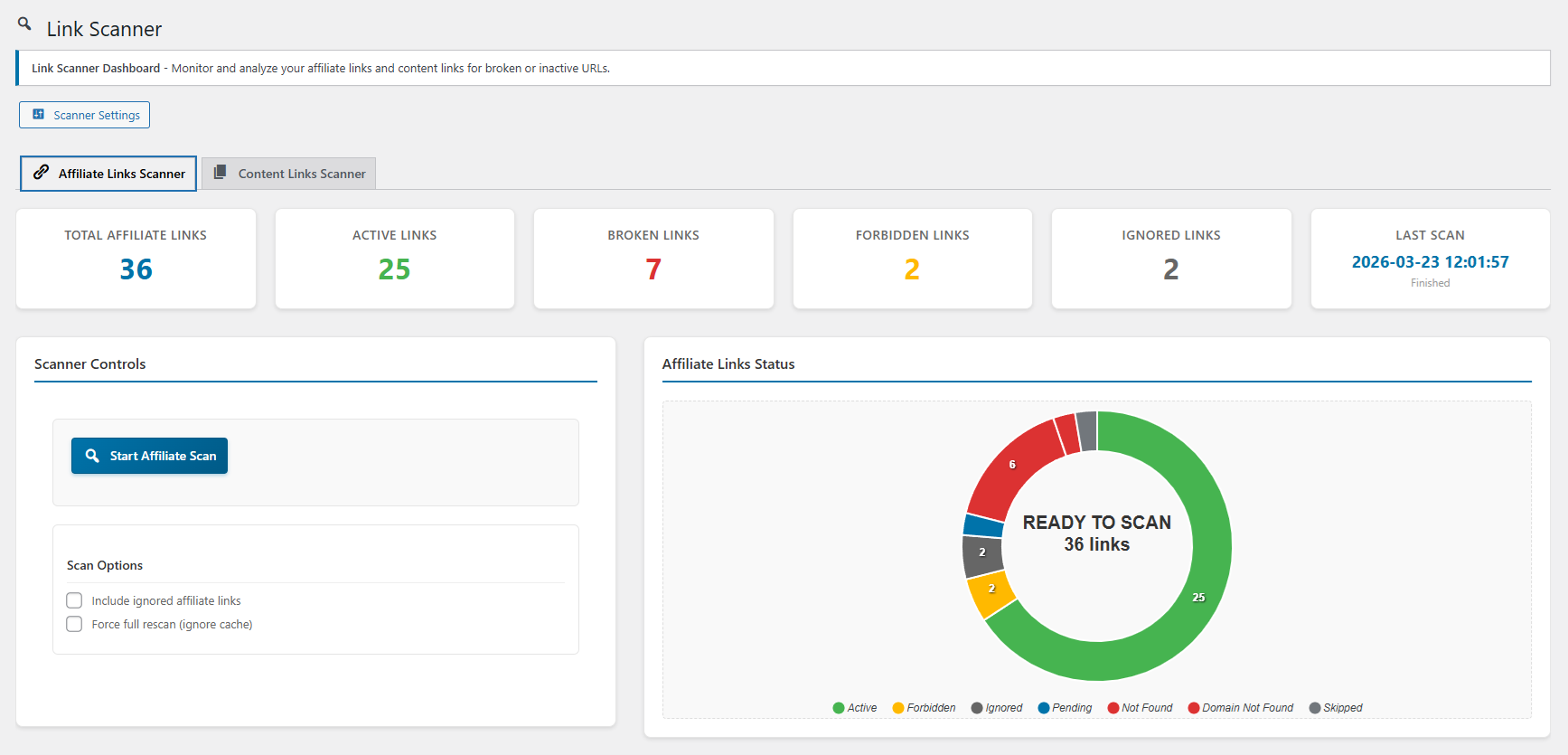
Link creation interface with advanced options 
Advanced analytics with geographic data and filtering 
Link management with categories, tags and bulk operations 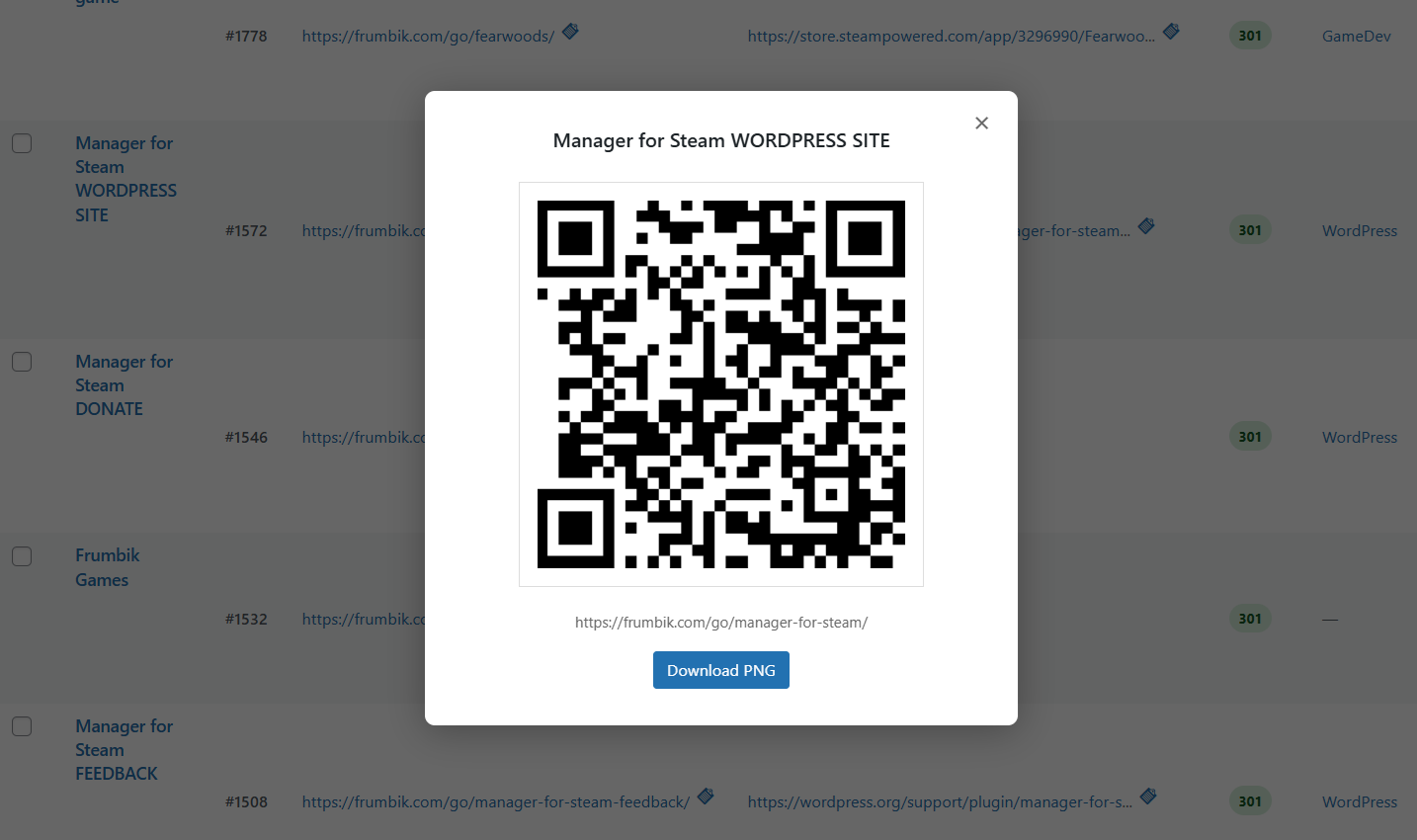
Keywords Autolinker configuration and keyword management
Blocks
This plugin provides 6 blocks.
- Link
- Amazon Product
- Amazon Comparison
- Amazon Bestseller
- Amazon Product Link
- Amazon Product Grid
Installation
Automatic Installation
- Log in to your WordPress dashboard
- Navigate to Plugins > Add New
- Search for “Frumbik Affiliate Hub”
- Click “Install Now” and then “Activate”
Manual Installation
- Download the plugin zip file
- Upload it via Plugins > Add New > Upload Plugin
- Activate the plugin through the ‘Plugins’ menu in WordPress
After Activation
- Go to Affiliate Hub in your WordPress admin menu
- Configure your settings under Settings tab
- Enable desired modules in the Modules tab
- Start creating your first affiliate links!
System Requirements
- WordPress 6.2 or higher
- PHP 8.1 or higher
- MySQL 5.6 or higher / MariaDB 10.0 or higher
- Minimum 64MB PHP memory limit (128MB+ recommended)
- cURL support for link validation
- MaxMind GeoIP2 database for geographical analytics (optional)
FAQ
-
How do I create my first affiliate link?
-
- Go to AffiliateHub Add New
- Enter your affiliate URL and a descriptive title
- Optionally customize the slug and settings
- Click Publish to create your clean link
-
Can I track clicks and conversions?
-
Yes! The Enhanced Analytics module provides comprehensive tracking including:
– Real-time click analytics
– Geographic data with world map visualization
– Browser and device detection
– Unique visitor identification
– Export capabilities for further analysis -
How does the Keywords Autolinker work?
-
The Keywords Autolinker automatically converts specified keywords in your content into affiliate links:
1. Enable the module in Settings Modules
2. Configure keywords in Settings Keywords Autolinker
3. Set up keyword-to-link mappings
4. The plugin automatically converts keywords in posts and pages -
Is the plugin GDPR compliant?
-
Frumbik Affiliate Hub is designed with privacy in mind:
– Click tracking and geolocation are disabled by default — you must explicitly enable them
– IP address anonymization option available (enabled by default)
– When geolocation is enabled, visitor IPs are sent to third-party APIs (ipapi.co, ip-api.com, or ipinfo.io) to resolve country/city — see each service’s privacy policy
– The plugin registers its data collection practices with WordPress Privacy Tools (Tools Privacy Policy)
– You are responsible for updating your site’s privacy policy to reflect any tracking you enable -
Can I monitor link health?
-
Absolutely! The Link Scanner module provides:
– Automated broken link detection
– Regular monitoring of all affiliate links
– Email notifications for issues
– Bulk health checks
– Detailed reports on link status -
How do I customize the link structure?
-
- Go to Settings General
- Set your preferred link prefix (default: “go”)
- Choose link behavior (301/302 redirects)
- Configure SEO options
- Your links will use the format: yoursite.com/go/your-slug
-
Does it work with caching plugins?
-
Yes! Frumbik Affiliate Hub is compatible with major caching plugins and includes:
– Performance optimization features
– Caching-friendly code structure
– Cache-busting for analytics when needed
– Integration with popular caching solutions -
Can I import existing affiliate links?
-
Yes! Use the Import/Export feature to:
– Import links from CSV or JSON files
– Bulk upload affiliate URLs
– Export existing data for backup
– Migrate from other link management tools -
How do I enable modules?
-
- Go to AffiliateHub Settings Modules
- Toggle the modules you want to enable
- Configure each module in its respective settings tab
- Some modules may have dependencies that need to be enabled first
-
What languages are supported?
-
Frumbik Affiliate Hub supports multiple languages:
– English (default)
– Polish (Polski)
– German (Deutsch)
– Spanish (Español)
– Community translations welcome!
Reviews
There are no reviews for this plugin.
Contributors & Developers
“Frumbik Affiliate Hub – Affiliate Links, Amazon Product Displays, Click Tracking & Geo-Targeting” is open source software. The following people have contributed to this plugin.
Contributors
Interested in development?
Browse the code, check out the SVN repository, or subscribe to the development log by RSS.
Changelog
2.1.8
- Fix: Link Scanner “Preferred Scan Time” and “Preferred Scan Day” now correctly used for cron scheduling
- Fix: Scan time uses WordPress timezone instead of arbitrary server time
- Fix: Show actual WordPress timezone name in scan time description
2.1.7
- Remove: Conversions and Heatmaps placeholder features — were UI-only with no backend implementation
- Cleanup: Delete orphaned wp_options on upgrade, recalibrate Analytics Score to 100 without placeholders
2.1.6
- Fix: Prevent browser from caching 301 redirects — every click now reaches the server for accurate tracking
- Fix: “Unique clicks only (24h)” checkbox now works during pagination and sorting in Recent Activity
- Fix: Consistent default type for Exclude Admin Tracking option across all trackers
2.1.4
- Rename plugin: add SEO keywords to plugin name for better WordPress.org visibility
2.1.3
- Fix: FastRedirect checks affiliate link FIRST, then page conflict — removes 2 slow queries from every frontend request
- Fix: Imported links _frumbik_custom_prefix set to actual prefix value — all 3 FastRedirect fallback queries now match
- Fix: Preview conflict detection uses prefixed slug — preview accurately predicts import results
- Fix: Click counts (META_CLICK_COUNT) updated after importing click history
- Fix: Click import limit raised to 50000 per batch — no more silently dropped clicks
- Fix: Slug prefix now applied during actual import (was only cosmetic in preview)
- Fix: Auto-dash separator for slug prefix — handles both trailing dash and underscore
- Fix: Preserve original post_modified date on imported links (edit_date => true)
- Fix: Results panel shows warning styling when import has errors
- Fix: Start Over button after rollback — user no longer stuck on Step 4
- Improvement: Removed competitor names and prices from plugin description
- NEW: Exclude Scanner Tracking setting — prevents Link Scanner from inflating click statistics
- Fix: Content Scanner skips own-domain affiliate redirect URLs (both prefixed and non-prefixed)
- Fix: Cleanup migration removes existing phantom scanner clicks and recounts affected links
2.1.2
- Fix: Instant affiliate link redirects — click tracking now runs AFTER redirect header is sent (via fastcgi_finish_request)
- Fix: Imported links use actual post_name for slug meta — prevents stale _frumbik_full_slug when WP modifies slug
- Fix: Set _frumbik_custom_prefix on imported links — FastRedirect matches on first query instead of fallback
- Fix: Rewrite rules flushed after migration import — imported links route correctly immediately
- Fix: Category assignments work across all AJAX import batches (term_map persistence)
2.1.1
- NEW: Migration Tool — import affiliate links from competing plugins with a 4-step wizard
- NEW: ThirstyAffiliates adapter — import links, categories, and click history
- NEW: Pretty Links adapter — import from custom tables with dual category support (Pro taxonomy + legacy groups)
- NEW: BetterLinks adapter — import from custom tables with batch category loading
- NEW: Conflict resolution — skip, rename, or overwrite duplicate slugs during import
- NEW: Dry-run preview — see what will happen before importing
- NEW: One-click rollback — undo any migration instantly
- NEW: CSV file import — upload any CSV with auto-detected columns (header-mapped)
- NEW: Source-specific conversion notices for non-standard redirect types and limitations
- Improvement: All imported links use correct frumbik* meta keys via MigrationEngine
- Fix: Category assignments now work correctly across all AJAX import batches
2.0.1
- NEW: Google Analytics 4 module — send affiliate link click events (slug, ASIN, marketplace, page URL) to GA4
- NEW: Optional gtag.js loading — use the plugin’s tag or your own existing setup
- Improvement: Rewritten plugin description for WordPress.org listing
- Version bump to 2.0.1
2.0.0
- NEW: Amazon Products module — product boxes, comparison tables, bestseller lists, and inline product links
- NEW: 5 Gutenberg blocks — Product Box, Product Link, Comparison Table, Bestseller List, Product Grid
- NEW: 4 shortcodes — [afh_product], [afh_product_link], [afh_comparison], [afh_bestsellers]
- NEW: Zero-API mode — display products without Amazon API credentials
- NEW: Bulk ASIN Import — add up to 200 products at once
- NEW: TOS Compliance Engine — automatic price freshness checks, affiliate disclaimers, and link transparency
- NEW: Geo-targeting across 22 Amazon marketplaces — no third-party service needed
- NEW: Amazon Creators API support alongside legacy PA-API 5.0
- NEW: Comparison Builder with drag-and-drop admin interface
- NEW: Price History tracking and visualization
- NEW: Per-product click analytics and product usage tracking
- NEW: Background auto-refresh keeps prices current via WP-Cron
- NEW: Manual product editing for full control over displayed data
1.1.6
- Fix: Email notification links now work with WPS Hide Login and similar plugins — AJAX-based redirect handler with HMAC token routes logged-in users directly to target page, unauthenticated users through login flow
1.1.5
- Fix: Restore Categories and Tags submenu items under Affiliate Hub menu — manually register taxonomy submenus since show_in_menu custom slug bypasses auto-registration
1.1.4
- Fix: Email notification links redirect to dashboard instead of target page when user is already logged in — replace wp_login_url() wrapper with admin_url(), WordPress auth_redirect() handles unauthenticated users natively
1.1.3
- Cleanup: Remove 1306 lines of dead code — 10 orphaned methods from FastRedirect (tracking pixel, direct access detection, inline traffic source), 2 dead methods from LinkScanner, dead charts-engine.js (879 lines)
- Fix: Gutenberg block editor broken — frumbik-block.js/css renamed to affiliate-hub-block.js/css but enqueue not updated
1.1.2
- Fix: Fast Redirect double-tracking — server-side record_immediate_click + tracking pixel caused 2x click counts; removed pixel backup, now single reliable server-side tracking for all clicks
- Cleanup: Removed dead enhance_tracking_data_for_js() method (modified local copy, changes discarded)
1.1.1
- Fix: Settings save — remove nested forms from GeneralTab/LinksTab (invalid HTML), remove dead legacy save handlers
- Fix: Boolean storage — change true/false to ‘1’/’0′ strings in all 7 affected settings tabs (38 checkbox options)
- Fix: GeolocationTab — add whitelist validation for primary provider select before save
- Cleanup: Remove dead save_settings() methods from GeneralTab/LinksTab
1.1.0
- Feature: Automatic recurring link scanning — schedule daily/weekly/biweekly/monthly scans for both affiliate and content links via WP-Cron
- Feature: Email notifications — receive HTML email reports when broken links are detected, with configurable recipient and notification triggers
- New settings: Automatic Scanning section + Scan Notifications section in Link Scanner settings tab
- Performance: Scan lock mechanism prevents overlapping scans via transient-based locking
- Security: Email recipient validated with sanitize_email() + is_email(), all email body data escaped
1.0.14
- Performance: Add ABSPATH guards to all 39 previously unguarded PHP files
- Performance: Add wp_cache_get/set to all 9 AnalyticsDashboard query methods (60s TTL)
- Performance: Set autoload=’no’ on 30+ admin-only options (only 7 frontend-critical keep autoload)
- Performance: Batch prefetch in content scanner — eliminates N+1 query (5000 1 query per scan)
- Performance: Scope DatabaseStatus inline JS to plugin pages only
1.0.13
- Security: Fix stored XSS via innerHTML in analytics-dashboard-production.js — all AJAX data now escaped with escapeHtml()/escapeUrl()
- Security: Fix XSS in geo-admin.js, tinymce-plugin.js, autolinker-admin.js — added escaping helpers
- Security: Add error logging to silent catch block in EnhancedClickTracker
- Security: Remove path disclosure from wp_die() in GeoLocation
- Security: Add current_user_can() check to ajax_get_links_list in LinkShortener
- Security: Remove vestigial nonce checks with discarded return values in ClickTracker
- Security: Fix esc_html() esc_attr() for HTML attributes in SmartOptimizationDashboard
- Security: Escape wp_die() strings in DatabaseStatus
1.0.12
- Fix: Both scan buttons did nothing — missing \ namespace prefix on wp_send_json_success (line 226) caused PHP Fatal after scan setup
- Fix: PHP Fatal “Cannot use object of type WP_Error as array” in HttpChecker — added is_wp_error() guard on GET fallback response
- Fix: ajax_recheck_content_link catch block used \Exception instead of \Throwable — TypeError not caught
- Fix: include_ignored/force_rescan scan options never worked — PHP checked === ‘true’ but JS sent ‘1’
1.0.11
- Fix: Content tab default view hid ignored links (showed 8 of 16) — removed ignored filter from default view to match affiliate tab behavior; default now shows ALL links, “Show only ignored” filters to only ignored
1.0.10
- Fix: Chart double-counted ignored links — status queries now exclude ignored rows; Total card still shows all links including ignored
1.0.9
- Fix: Ignored content/affiliate links lost after rescan — scanner skipped row creation for ignored links (continue), now always inserts with ignored=1; get_pending_links() already filters ignored=0 so no HTTP checks wasted
1.0.8
- Fix: Scanner Controls + Chart not side-by-side — flex-direction:column breakpoint was 1024px, but WP admin sidebar takes ~160px so laptops (1280-1366px) had content area < 1024px. Changed to 782px (WP admin standard). Removed min-width:320px on right column, added flex-wrap.
1.0.7
- Fix: Charts stuck on “Loading chart…” — render-ready flags with queued updates prevent race condition; empty series guard for zero-data state; AJAX error handlers added
- Improve: Scanner layout — Controls 40% + Chart 60% side-by-side on desktop, stacked on mobile (responsive)
1.0.6
- Fix: Cannot unignore content links — PHP !empty(“false”)=true bug; changed to === ‘true’ comparison matching affiliate handler
- Fix: Scanner Settings button URL used old edit.php?post_type= path instead of admin.php?page=
- Fix: Boolean parsing bugs in scan options (include_ignored, force_rescan) — (bool)”false”=true in PHP
- Cleanup: Removed dead duplicate window.ignoreContentLink function
1.0.5
- Fix: “Ignore this link” on content tab made links disappear permanently — aligned filter logic with affiliate tab (show_ignored instead of include_ignored); ignored links now visible via “Show only ignored links” checkbox with unignore capability
1.0.4
- Fix: Content chart stuck on “Loading chart…” — case-sensitive scan status comparison (Finished vs finished)
- Fix: Broken Links count excluded ‘failed’ status — added to SQL IN clause and PHP aggregation
- Fix: “Showing 0-0 of 0 entries” — parameter order mismatch in get_content_links_total() ($postmeta in %d slot)
- Fix: Export CSV broken — removed duplicate JS stub that overwrote implementation, added PHP ajax_export_content_csv handler
1.0.3
- Fix: Affiliate scanner used get_latest_scan() (any type) instead of get_latest_scan_by_type(‘affiliate’) — could cross-contaminate with content scan results
- Fix: MAX(scan_id) subqueries in affiliate queries lacked scan_type=’affiliate’ filter
- Fix: Broken Links summary card double-counted — status ‘broken’ was set then incremented
1.0.2
- Fix: Content links table showed more entries than summary cards — table/pagination queries lacked scan_id filter (queried all historical scans instead of latest only)
- Fix: LIKE wildcard escaping in get_content_links_total — single % %% for wpdb::prepare() compatibility
1.0.1
- Fix: Content Link Status chart not updating during scanning — in-progress branch now returns granular status counts (not_found, server_error, etc.) matching chart JS expectations
- Fix: currentContentScanId never assigned during content scan — processPendingContent() was always bailing out
- Fix: Content Links Results filter “show ignored” always ON — PHP parsed boolean false as truthy string
- Fix: Sections visually merged on content-links tab — removed 5 orphaned closing div tags, added .analytics-card CSS
- Fix: Content chart rendered in hidden container — removed cross-tab initialization from affiliate tab
1.0.0
- Initial stable release
- Core affiliate link management with clean URL cloaking and 301/302/307 redirects
- Enhanced Analytics Dashboard with interactive ApexCharts visualizations
- Advanced click tracking with unique visitor detection and IP anonymization
- GeoLocation tracking with MaxMind GeoLite2 database integration
- Fallback IP geolocation via IP-API.com, IPApi.co, and IPInfo.io
- Keywords Autolinker for automatic keyword-to-affiliate-link conversion
- Link Scanner module for broken link detection and monitoring
- User Agent Detection for browser, device, and OS analytics
- Performance Monitor for system optimization insights
- Health Monitor with diagnostic tools
- Modular architecture — enable only the features you need
- Category and tag organization for affiliate links
- Shortcode support with multiple display options
- TinyMCE editor integration for easy link insertion
- Gutenberg Block Editor integration for inserting affiliate links
- Setup Wizard with guided onboarding for new users
- Query parameter forwarding from cloaked URLs to destination URLs
- QR Code generation for affiliate links with PNG download
- Import/Export functionality (CSV and JSON formats)
- Multilingual support (English, Polish, German, Spanish)
- Mobile-responsive admin interface
- GDPR compliance features with IP anonymization and data minimization
- Full WordPress Coding Standards (WPCS) compliance
- All SQL queries use $wpdb->prepare() with identifier placeholders
- All output properly escaped at point of rendering
- Nonce verification on all forms and AJAX requests
- Capability checks on all privileged operations